Switching booking platforms is one of those tasks that sounds straightforward until you're in the middle of it. The good news is that with the right preparation it's manageable — and the disruption to your clients, if handled well, can be minimal. This guide walks through what actually transfers, what requires manual work, and how to make the transition as smooth as possible.
Why studios switch
Cost increases, complexity that's outgrown their needs, a marketplace conflict they didn't anticipate, or support that disappeared after the contract was signed. Whatever the reason, the decision to switch is rarely taken lightly — which means that by the time a studio owner starts looking at alternatives, they're motivated to make it work. The question is how.
The good news: what transfers easily
The foundation of your client database — names, email addresses, phone numbers — exports cleanly from most platforms as a .csv or Excel file. This is the straightforward part and worth acknowledging first.
It's also worth understanding the legal picture, because it strengthens your position when dealing with platforms that are slow to cooperate. GDPR's right to data portability — set out in Article 20 — applies to personal data about you as an individual. As a studio owner, that covers your own account data. Your client list is a separate matter: it's your business data, collected and managed by you, and the platform holds it on your behalf. Legally, a platform cannot hold your client data hostage when you decide to leave.
The obligation under GDPR is that data must be exportable in a machine-readable format. In practice this means a structured file — a .csv, an Excel export, or in some cases a JSON database dump that can be read by a machine or processed by AI. It may not always be a clean one-click export, and for more complex data like bookings, payments, and notes you may need to request it explicitly from support. But the obligation exists, and citing Article 20 in that conversation tends to accelerate the response considerably.
The practical summary: your client list is yours, your booking history is yours, and any platform you work with is required to give it back to you in a usable format when you ask. Get confirmation of this before signing any contract, not after. For a broader look at what to ask before choosing a platform — including client booking options and data ownership questions — that guide covers it from the outset.
One thing to watch for: some platforms charge a fee to export your own data when you cancel. Mindbody, for example, does not disclose this upfront — their official support page instructs you to "speak to the agent who is taking care of your cancellation request for the price." That fee applies specifically to a full subscriber data export — the complete dump that includes payment history and financial records. Basic client lists can be exported manually for free, though with difficulty and missing fields. The practical reality: leaving cleanly, with everything you need, can cost studios up to $500 USD. That is, to receive a complete file of data you generated and own, framed as a "service." It's worth asking any platform you're evaluating — directly and in writing — whether there are any fees associated with a full data export, before you're in a position where you need it. We've covered this and other hidden Mindbody costs in our full Bobclass vs Mindbody comparison.
The honest part: what requires manual work
This is what most switching guides skip, and what catches studios off guard mid-migration. Be prepared for the following:
Active class passes — passes currently held by clients need to be re-entered manually in the new system. There's no universal standard for how pass data is stored, so automated transfer between platforms is rarely possible. Each active pass needs to be created for the relevant client in the new system.
Partially used passes — a client who has used 4 of their 10-session pack needs a pass in the new system reflecting 6 remaining sessions, not 10. Going through each active pass and checking the remaining balance is time-consuming but essential. Clients notice immediately if their balance is wrong.
Historic bookings — past attendance records don't transfer. If you need historic data for reference, export it from your current platform before you cancel your subscription and keep it as a separate file.
Recurring bookings — regular clients booked into the same class every week need to be re-added to those classes in the new system. Depending on how many recurring bookings you have, this can take a few hours.
Field formatting — even the client list export, which is the easy part, often has formatting inconsistencies. Phone numbers stored with country codes in one platform may not match the expected format in another. Date formats vary. Column names rarely match exactly. Budget time for cleaning the file before import rather than assuming it will go in cleanly.
The honest summary: a migration is a few days of careful administrative work, not a one-click transfer. Knowing this upfront makes it manageable. Discovering it halfway through is what causes panic.
First setup mistakes to avoid
Once your data is in the new system, the configuration stage is where most studios make avoidable errors. From real-world Bobclass onboarding experience, the most common:
Activity type confusion — the distinction between a group class and a private appointment (1:1 session) is fundamental and affects everything downstream: what's visible to clients online, how bookings are managed, how instructor availability works. Getting this wrong at setup means unpicking it later under live conditions. Take time to understand how your new platform handles both before creating any classes.
Recurring events and participants — when setting up recurring group classes, clarify whether existing participants carry across automatically or need to re-book. Different platforms handle this differently. Assuming it works one way when it works another leads to either double-booked clients or empty classes.
Visibility settings — group classes should be publicly visible for client self-booking. Private 1:1 appointments should not. A common oversight is leaving appointments visible online, which leads to clients attempting to book slots intended for specific individuals. Check visibility settings for every class and activity type before going live.
Teacher-activity mapping — every instructor needs to be assigned to the specific activity types they're qualified and available to teach. Skipping this step leads to a frustrating and confusing error later: you try to assign an instructor to a class and they don't appear in the dropdown, even though they're clearly in the system. Set this up before creating any classes.
Getting help during the migration — before you've committed to anything
This is where platforms differ significantly and where it's worth asking a direct question before you start.
Most major platforms won't provide meaningful migration support until you've signed a contract and are on a paid plan. If you hit a problem mid-import while still evaluating whether to switch, you're largely on your own. For a studio owner already stretched for time, that's a real barrier.
Bobclass handles the client import for you regardless of which plan you're on — including the free plan. Send your .csv or Excel file to import@bobclass.com and the import is typically completed within a day. Want to bring your existing schedule across too? Send screenshots of it to the same address and we'll import that as well. Magically. You can ask questions at any stage of the process — before, during, and after — without needing to commit to a paid plan first. The logic is simple: if the migration is the hardest part of switching, removing that friction is the right thing to do for a studio considering making the move.
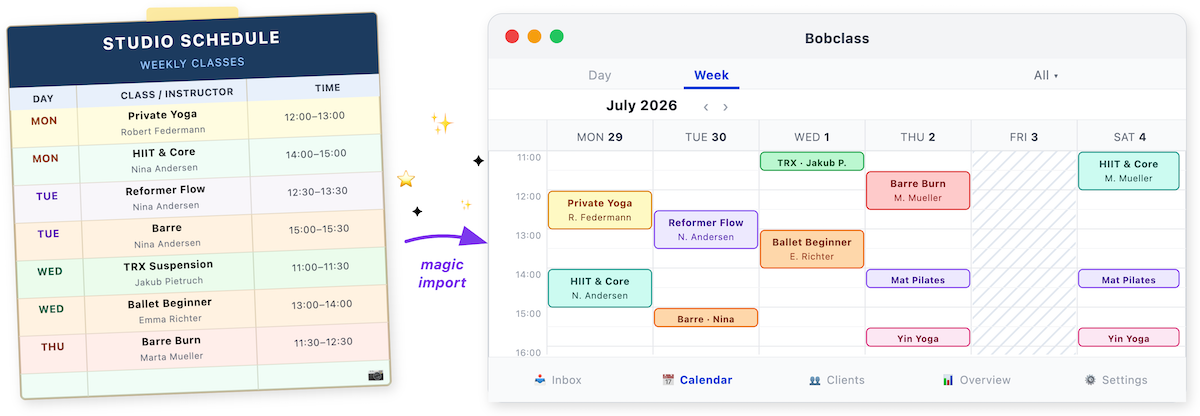
We offer you the Studio plan free for the full remainder of your contract. Set up your schedule, import your clients, and run your studio on it properly before you pay a thing. Email support@bobclass.com to arrange it.
How to communicate the switch to your clients
The migration itself is internal — clients don't need to know the details. What they need to know is where to book from a specific date. A few principles that make the client communication go smoothly:
Frame it as an upgrade, not a disruption. "We've moved to a new booking system that makes it easier to book and manage your classes" lands better than "we're switching platforms."
Give at least two weeks notice. This gives clients time to download a new app or bookmark a new booking page before the old one disappears.
Send a direct link. Don't ask clients to search for your studio in a new app — send them directly to your booking page or the app download link. Every extra step is a drop-off risk.
Follow up once the switch is live. A short message confirming the new system is up, with the link again, catches anyone who missed the first announcement.
A realistic timeline
Budget three to four weeks for a clean migration. Rushing it is the most common cause of client-facing problems.
Export and prepare
Export your client list and all relevant data from your current platform. Set up your new system — configure activities, instructors, schedule, and visibility settings. Don't rush this stage.
Import and rebuild
Import client data, re-enter active passes with correct remaining balances, recreate recurring bookings. Send your file to import@bobclass.com if you're moving to Bobclass.
Soft launch
Invite a small group of existing clients to test the new booking flow before the full switch. Catch any issues while the stakes are low.
Full switch
Communicate to all clients. Retire the old system only once you're confident the new one is working correctly.
The mystery shopper step
Before telling any client the new system is live, go through the entire booking flow yourself as if you were a new client. Create a test account with a personal email address, find your studio, book a class, receive the confirmation, and if possible cancel it and rebook. This single step catches more configuration problems than any checklist — and it's the difference between your clients discovering an issue and you discovering it first.
For how to approach client retention through the transition period — including how to re-engage clients who go quiet after a system change — that guide covers the early warning signs and outreach approach specifically.