You did not train as a Pilates instructor to spend your Tuesday evening chasing an unpaid invoice. And yet — here we are.
Collecting payment sounds like the simple part of running a studio. It isn't. The invoice you meant to send last week. The bank transfer you keep meaning to verify. The membership renewal that slipped through while you were teaching back-to-back sessions. For a boutique studio, payment admin is almost entirely avoidable — but only if the setup is right.
Bobclass has invoicing built directly into the studio management app, covering every common scenario: online card payments, bank transfers, hand-issued PDF invoices, cash, and — new — memberships that renew and collect automatically. Each flow produces a proper record (invoice number, date, amount, client) without a separate accounting tool or a spreadsheet that you'll inevitably lose.
This guide explains how each flow works, what it costs, and which situations each one is actually suited to.
How payment gets collected
There is no single "correct" way to invoice Pilates clients: it depends on your clients' preferences, your country, and how your studio is set up. The flows break down along two axes — who initiates the purchase, and how the client actually pays — plus one that, once set up, runs on its own.
Client pays by card
The client browses your store and buys a class pack, membership, or shop item. They pay by credit or debit card via Stripe at checkout.
Bobclass registers both the sale and the payment against it automatically. No chasing, no follow-up. The client gets a receipt; you get paid.
Stripe processing fee appliesClient pays by bank transfer
Same online checkout flow, but the client selects bank transfer instead of card. They see your bank details and confirm in the app that they've made the transfer.
You verify in your bank account and mark it as paid in Bobclass. A bit more manual, but no processing fee, and popular in markets where bank transfer is simply the default.
No processing feeYou send an e-invoice link
You create the invoice in Bobclass and send the client a payment link — by email or WhatsApp. The client clicks it and pays by card via Stripe, without needing to log in or create an account.
In Bobclass, the sale is registered and the card payment is recorded against it automatically. Good for membership renewals, one-off sessions, or any time you want the convenience of card payment without the client going through the store themselves.
Stripe processing fee appliesYou send a PDF invoice
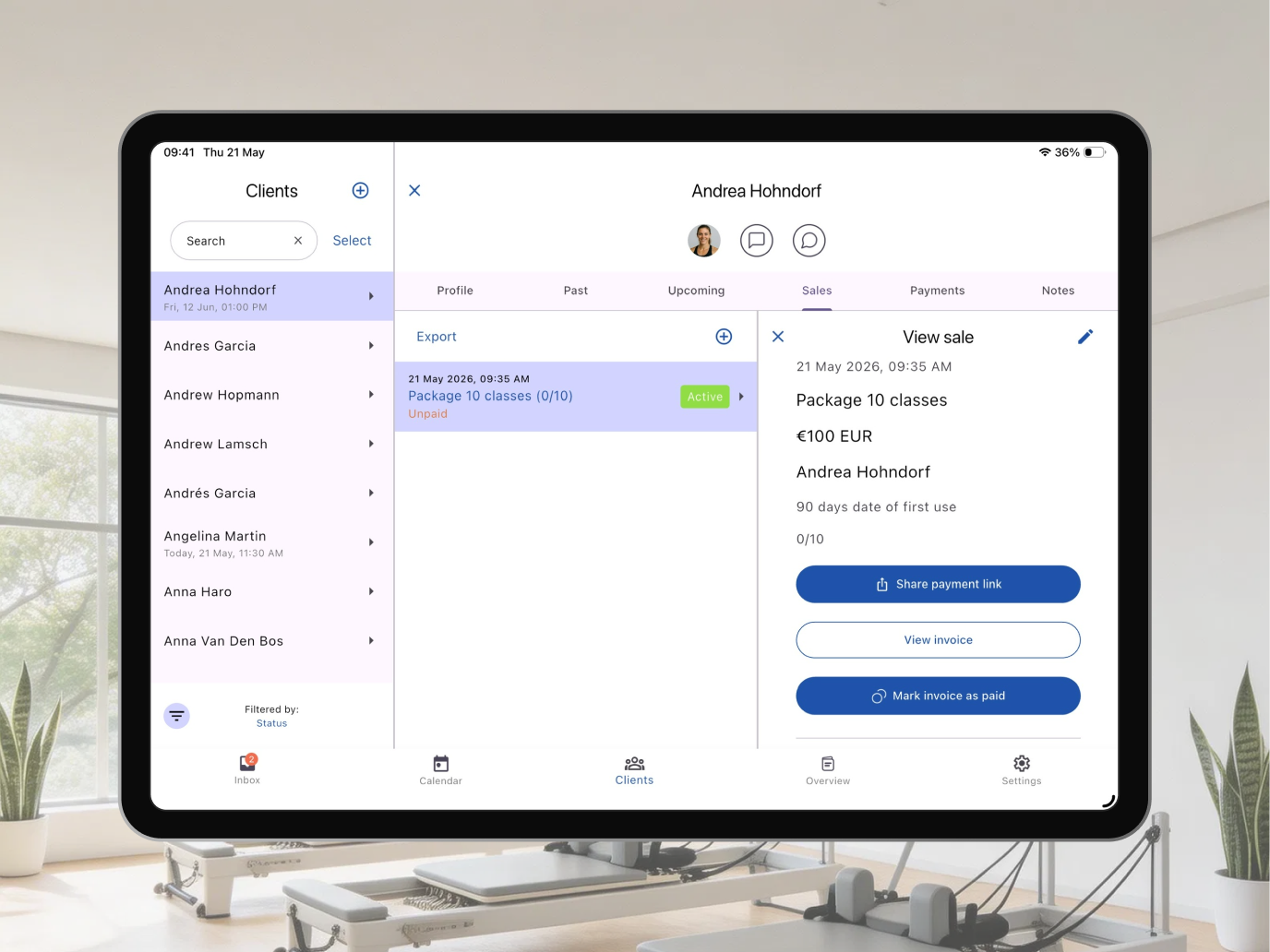
You create the sale in Bobclass, which registers it and generates a properly formatted PDF invoice — IBAN/BIC, Swiss QR code, or whatever your local format requires. You then send it to the client by email or WhatsApp.
The client pays by bank transfer and you mark it as paid. Good for corporate clients, longer-term agreements, or anywhere a formal document is expected.
No processing feeClient subscribes, then pays automatically
The client buys an auto-renewing membership in the Bobclass Go store — once. From then on Stripe charges them at the interval you set, by SEPA direct debit (they accept a mandate first) or by card. No invoice to send, no gap between periods.
Nobody is charged without having agreed to it, and either side can cancel at any time. Available on the Studio plan. How it works →
Stripe processing fee + Stripe Billing feeClient pays in person
Client pays cash. You mark it as paid in Bobclass, which generates a receipt PDF you can send to the client or keep for your own records. Less common than it used to be, but still happens — walk-ins, drop-ins, or clients who simply prefer it.
No processing feeStripe fees are real: typically 1.5–2.9% plus a small fixed amount per transaction, depending on card type and country. We don't add anything on top of that; it's what Stripe charges, and every card payment processor charges something comparable. If you'd rather avoid it entirely, bank transfer and PDF invoice are both free — the trade-off is that you need to check your bank account and mark payments manually. For monthly memberships or large packs, that's usually no hardship. For high-frequency small transactions it might be worth the convenience of card. Auto-renewing memberships carry one more Stripe fee on top: Stripe Billing, the subscription engine, takes 0.7% of billing volume. SEPA direct debit itself is a flat €0.35 per charge — no percentage.
Local invoice formats — because one size does not fit all
If you've ever sent a bank transfer to someone in Switzerland and wondered why it went smoothly when you used their QR code but the manual IBAN route was awkward — you understand why local payment formats matter. Different countries have different standards, and clients expect invoices that match what they're used to.
Bobclass lets you configure your local payment format in settings, so generated PDF invoices always use the right format for your market.
The standard across the eurozone and most of Europe. Invoices include your IBAN and BIC/SWIFT code — everything a client needs to make a bank transfer.
Switzerland uses QR-bill format: a scannable QR code containing all payment details, included directly on the invoice PDF. Swiss banking apps read it automatically; no manual entry needed.
UK domestic transfers use a 6-digit sort code and 8-digit account number — not IBAN. Invoices display both in the format UK banks expect for Faster Payments.
US domestic transfers use account number and routing number (ABA). Invoices display both in the format US banks expect.
For markets not covered above, you can define a custom payment details block — any combination of fields you need — which Bobclass includes on generated invoices.
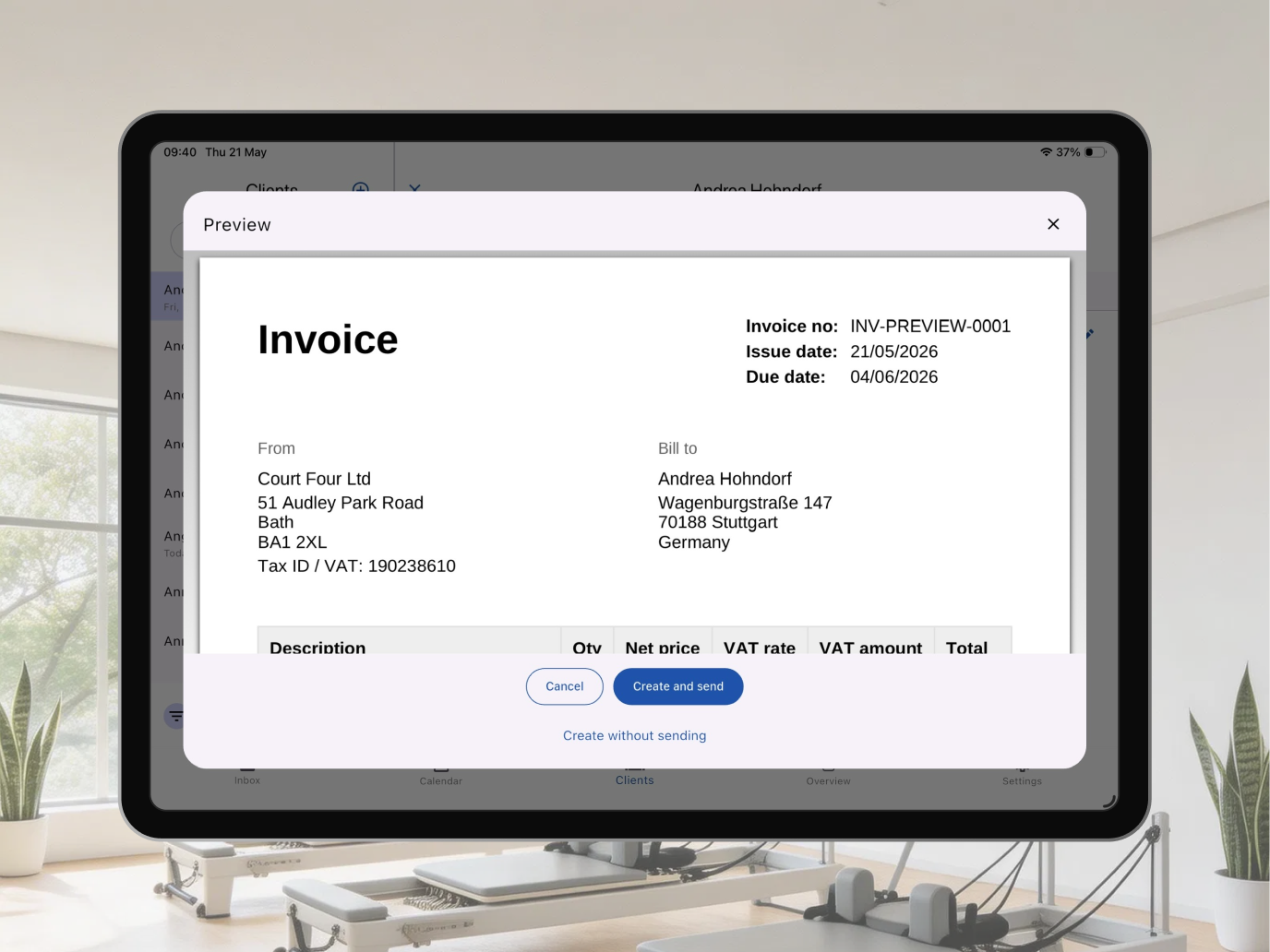
This matters more than it might seem. A studio in Vienna or Amsterdam sending a professionally formatted invoice with the correct IBAN/BIC looks like a proper business. A studio in Zurich whose invoices include a scannable Swiss QR code is saving clients a manual copy-paste step on every payment. Small things — but the kind of small thing that clients notice and that sets you apart from the studio that emails a screenshot of their bank details.
What gets generated automatically
Whichever flow you use, Bobclass generates a complete paper trail:
- Invoice number — sequential, consistent, what your accountant needs
- Date of issue and due date — configurable on manually issued invoices
- Line items — class pack, membership, session name, quantity, unit price
- Total and VAT — if applicable for your setup
- Your studio's payment details — in the local format you've configured
- Payment status (unpaid, paid, overdue), always up to date in your client view
For cash payments, Bobclass generates a receipt rather than an invoice — same structure, but marked as received rather than due.
Which flow for which situation
Most studios end up using two or three flows in practice, not one. Here's how they typically break down:
| Situation | Recommended flow | Why |
|---|---|---|
| New client buying their first class pack online | Online purchase · card | Immediate confirmation, no follow-up needed |
| Regular client who prefers not to use cards | Online purchase · bank transfer | Same online flow; no Stripe fee |
| Membership renewal for an existing client | Studio-initiated · e-invoice link | You send the link directly; client pays by card without going through the store |
| Corporate client (HR buys a block for an employee) | Studio-initiated · PDF invoice | Finance teams expect a proper document they can approve and file |
| Client in Switzerland paying by bank transfer | Studio-initiated · PDF invoice | Swiss QR code on the PDF makes the transfer frictionless |
| Walk-in or drop-in paying at the door | Cash | Quick, receipt generated, no friction |
| Monthly membership you'd rather not chase | Auto-renewing · SEPA or card | Client subscribes once; Stripe collects each period, no invoice needed |
Memberships and renewals
A membership in Bobclass can renew in one of two ways. You choose per membership.
Manual renewal is the default. When a period ends, you add a new sale for the client and send them a payment link, a PDF invoice, or both — straight from the app via WhatsApp or email. A few clicks, full control. It keeps the renewal conversation in your hands, and a personal message with the invoice feels like service, not a bill. Most clients renew without comment.
Automatic renewal charges the client at a fixed interval — monthly, say — with nobody having to lift a finger. Under the hood it's a genuine Stripe subscription, collected by SEPA direct debit (the client accepts a mandate once) or by card. Nobody gets charged without having agreed to it, and either side can cancel at any time: the client from the Stripe customer portal in Bobclass Go, you from their profile. It closes the gap in income between periods; the trade-off is a small Stripe Billing fee on top of the usual processing fee. How it works →
Automatic renewal is available on the Studio plan.
What about accounting and VAT?
To be clear about scope: Bobclass is a studio management tool, not a bookkeeping package. It keeps a clean, sequentially numbered record of every transaction, which is exactly what your accountant wants, but it doesn't connect to Xero, file your VAT return, or do anything you'd describe as accounting software.
For most boutique studios, that's fine. Export your payment history at year end, hand it to your accountant, done. If you're VAT-registered, Bobclass invoices include a VAT field you can configure. If you need deeper integration with bookkeeping software, you export the data and import it elsewhere — once a month is typically plenty, and it takes minutes.
If you were hoping for a one-stop accounting solution: that's a different category of tool. But for keeping a tidy payment record and getting invoices out the door without fuss, Bobclass does the job.
The biggest variable in payment speed isn't which flow you use — it's how quickly you send the invoice. Studios that invoice immediately after the session or purchase get paid faster than those that batch invoices at the end of the month. Bobclass makes issuing an invoice from the session view a matter of seconds, which removes the main reason studios delay: it's no longer a task you defer to later.
Related guides
Invoicing sits alongside the broader question of how clients book and pay for sessions in the first place — whether you offer online booking, offline booking, or a mix. That guide covers the options in more detail, including how to structure packs and memberships for different client types.
If you're evaluating Bobclass against a platform you're currently on — or thinking about switching — the switching guide covers what to expect from the transition, including how payment history and client data carry over.