Card payments are convenient — until you do the maths on the fees. At 1.5–2.9% per transaction, a €120 class pack costs you somewhere between €1.80 and €3.50 every time a client pays by card. Across a year of renewals, that's real money quietly leaving through the back door.
Bank transfers solve this. There's no processing fee, no middleman skimming a percentage, and in many European markets — Germany, the Netherlands, Switzerland, Austria — clients actively prefer bank transfer over entering their card details online. It's simply how people pay for things.
The catch has always been the admin: you have to check your bank account, match payments to clients, and mark things as paid manually. Bobclass — a studio management app for Pilates, yoga, personal training, golf and fitness studios — handles the record-keeping side of this so the manual step is quick rather than chaotic: thirty seconds to reconcile rather than fifteen minutes hunting through statements.
There are two distinct flows, depending on who initiates the transaction.
The two bank transfer flows
Client buys online, pays by bank transfer
The client browses your store — class packs, memberships, shop items — and selects bank transfer at checkout instead of card. They see your bank details and confirm in the app that they've made the transfer.
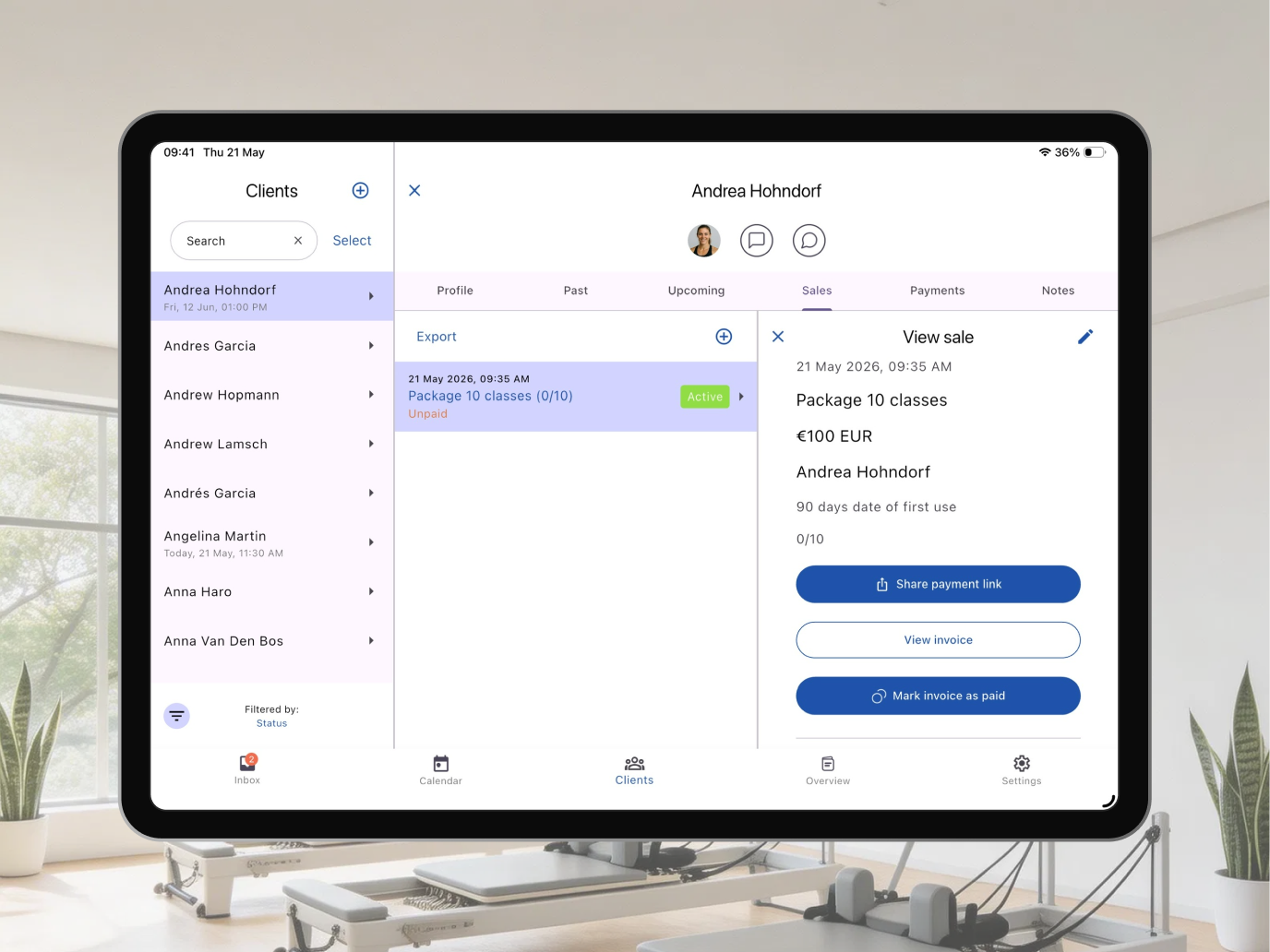
Bobclass registers the pending sale immediately. Once you see the money in your account, you mark it as paid in one tap. The client's pack or membership activates, and the record is updated.
No processing feeA clean, no-friction checkout
The client doesn't need to enter card details or create a Stripe account. They see your bank details — IBAN, account number, whatever your local format uses — and transfer from their own banking app.
Many clients, particularly in Germany, the Netherlands, and Switzerland, find this more comfortable than entering card details into a fitness studio's website. It's what they do for everything else.
No card details requiredYou create a sale and send an invoice
You create the sale in Bobclass — a membership renewal, a block of sessions, or a one-off charge. Bobclass generates a properly formatted PDF invoice with your bank details, ready to send.
You send it via WhatsApp or email directly from the app. The client pays by bank transfer; you mark it as paid when the money arrives.
No processing feeCorporate clients and formal billing
Finance teams and HR departments expect a proper document they can approve, file, and put through their accounts. A PDF invoice with a sequential invoice number satisfies that requirement — a payment link does not.
Also common for long-term agreements or any client who has specifically asked to be invoiced rather than buy online.
Invoice number, date, line itemsReconciliation — the part nobody talks about
The honest limitation of bank transfers is that the money doesn't arrive with a label attached. Someone named "M. Schmidt" has transferred €120, and you need to work out which client that was and which sale to mark as paid. In a small studio with a handful of bank transfer clients, this is trivial. If you've never had a system for it, though, it can quietly become a mess.
Here's how to make it not a mess:
The pending sale is already in Bobclass
As soon as a client confirms a bank transfer purchase in your store, Bobclass creates the sale as "awaiting payment." You don't need to create anything manually — it's already in the system, against the right client, for the right amount.
Check your bank account once a day
A single daily habit — glance at incoming transfers, cross-reference the pending sales list in Bobclass — keeps everything in sync. With a small studio, this takes less than two minutes.
Mark as paid in one tap
Open the sale in Bobclass, tap "Mark as paid." The client's pack or membership activates immediately. The invoice updates to show the paid date. Done.
Add a reference to reduce ambiguity
Ask clients to include their name and a reference (e.g., "Schmidt — 10-class pack") when making the transfer. You can include this instruction in your bank details and in the confirmation email. Not everyone will follow it, but enough will to make matching straightforward.
Bank transfers are not instant in most countries — SEPA transfers typically arrive within one business day, sometimes longer. If a client needs their pack activated immediately, card payment is faster. For planned purchases — memberships, blocks of sessions booked in advance — the slight delay rarely matters.
Local formats — because payment details vary by country
A studio in Vienna and a studio in Zurich both accept bank transfers, but the payment details on their invoices look completely different. Clients expect invoices that match what their bank expects. Bobclass lets you configure your local payment format in settings, so generated invoices and checkout screens always show the right information for your market.
The standard across the eurozone and most of Europe. Your IBAN and BIC/SWIFT code are everything a client needs to make a SEPA transfer.
Switzerland uses QR-bill format: a scannable QR code included directly on the invoice PDF. Swiss banking apps read it automatically — no manual entry, no transcription errors.
UK domestic transfers use a 6-digit sort code and 8-digit account number — not IBAN. Invoices display both in the format UK banks expect for Faster Payments.
US domestic transfers use account number and ABA routing number. Invoices display both in the format US banks expect.
For markets not covered above, you can define a custom payment details block — any combination of fields — which Bobclass includes on generated invoices and at checkout.
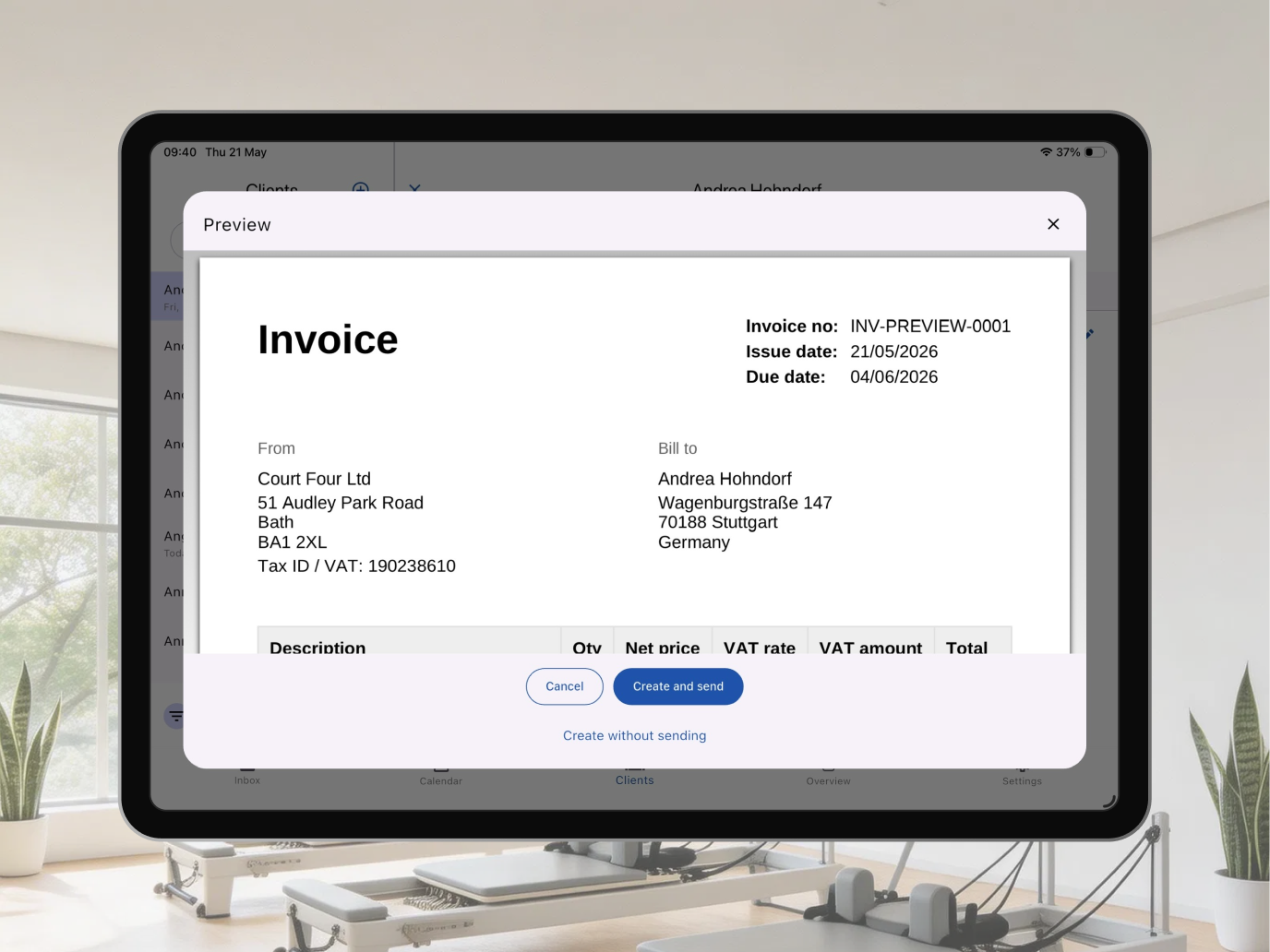
What every bank transfer generates automatically
Whether the transfer came from an online store purchase or a studio-initiated invoice, Bobclass produces a complete record:
- Invoice number — sequential, consistent, what your accountant expects
- Date of issue and due date — configurable on manually issued invoices
- Line items — class pack name, membership, quantity, unit price
- Total and VAT — if applicable for your setup
- Your payment details — in the local format you've configured
- Payment status — unpaid, paid — always current in your client view
Which flow fits which situation
| Situation | Flow | Why |
|---|---|---|
| Client prefers bank transfer and shops in your store | Online purchase · bank transfer | No card details, no Stripe fee, you reconcile when the transfer arrives |
| Membership renewal for an existing client | Studio-initiated · PDF invoice | You control the timing; a personal message with the invoice feels like service |
| Corporate or HR client billing | Studio-initiated · PDF invoice | Finance teams need a document with a number, not a payment link |
| Client in Switzerland | Either flow · Swiss QR format | The QR code on checkout and invoices makes the transfer one scan |
| Client in Germany or the Netherlands | Online purchase · bank transfer | Bank transfer is often the preferred default — offering it removes friction at checkout |
| Client needs their pack active immediately | Card payment | Bank transfers have a processing delay; card is instant |
Card payments activate instantly and require no reconciliation on your end. Bank transfers have no processing fee but require a daily check-and-mark-as-paid habit. For most boutique studios, a mix of both works well: offer bank transfer as a checkout option for clients who prefer it, and use PDF invoices for memberships and corporate billing. Neither approach is wrong — the right answer depends on your clients and your market.
Frequently asked questions
Can clients pay by bank transfer when buying from my store?
Yes. In the Bobclass Go client app, clients can select bank transfer at checkout instead of card. They see your bank details, confirm the transfer in-app, and the sale is registered as pending until you mark it paid. No card details required, no processing fee.
How does reconciliation work?
When a client selects bank transfer at checkout, Bobclass registers the sale immediately as "awaiting payment." Once you see the money in your bank account, open the sale and tap Mark as paid — the client's pack or membership activates on the spot. No spreadsheet needed.
Does Bobclass support Swiss QR code invoices?
Yes. Configure Swiss QR-bill format in your Bobclass settings. Generated PDF invoices include a scannable QR code that Swiss banking apps read automatically — no manual entry for your clients.
Is there a fee for accepting bank transfers?
No processing fee at all. Card payments via Stripe incur Stripe's standard rates (typically 1.5–2.9% per transaction). Most studios offer both and let clients choose — bank transfer for regulars and corporate clients, card for convenience.
Related guides
For studio-type specific payment guides: invoicing Pilates clients covers all four payment flows with Pilates-specific examples for packs, memberships, and private sessions. The same flows apply whether you run a yoga studio, a personal training business, or a golf academy.
Bank transfers are one part of the broader question of how clients book and pay. The booking options guide covers how to structure your offer — online booking, offline booking, drop-ins — and how payment method fits into that picture.